




Ready to kickstart your next big project?
Let's innovate together.
As artificial intelligence (AI) continues to weave itself into the fabric of our daily lives, its role in software development has become increasingly transformative. IBM and Morning Consult recently did a survey of 1,000 developers who are building AI applications for enterprises, and a whopping 99% of them said they're exploring or developing AI agents. Meanwhile, nearly 26% of tasks performed by junior application developers will be augmented or fully automated by 2027.
Tools like GitHub Copilot stand at the absolute precipice of this sea change, acting as an assistant that offers real-time suggestions, completes lines of code, and even generates entire functions. It's like, for instance, having a coding partner sitting right there next to you – one who’s always ready to assist, but what if that partner shifts over, and takes your seat? The million dollar question, on everyone's mind at the moment, is will GitHub Copilot replace developers?
Let's not make use of cliffhangers here. The short answer is no, replace is simply not the word to describe our relationship with new tools and ways of working impacted by AI. But upend, augment, fundamentally change? Absolutely. Let's take a deeper look at how we can expect developers roles to change in the not-to-distant future...
Key Features of GitHub Copilot Include:
- Code Suggestion: Provides real-time code completion.
- Boilerplate Generation: Automates the creation of standard code snippets.
- Error Detection: Highlights potential code mistakes.
- Learning Support: Assists beginners with helpful code prompts.
For developers, we suppose you already knew that! For those outside the techie space, Copilot features are less about replacing jobs and more about enhancing their workflow and potential. By focusing on meaningful tasks, developers can drive innovation and quality in their everyday work.
How GitHub Copilot Works: From Training to Code Suggestions
GitHub Copilot relies on machine learning models trained on extensive datasets. The effectiveness of these suggestions depends on several factors:
- Quality of Training Data: Better datasets yield better insights.
- Contextual Understanding: The more precise the initial prompt, the better the outcomes.
- Developer's Input: Inputs impact the relevance of suggestions.
While Copilot can generate impressive results, there are certainly limitations. No tool, right now, is completely beyond human oversight. It’s crucial for developers to review the code Copilot suggests. This blend of human judgment and AI capabilities ensures secure code solutions in any development setting.
The Productivity Promise: What Copilot Brings to Developers
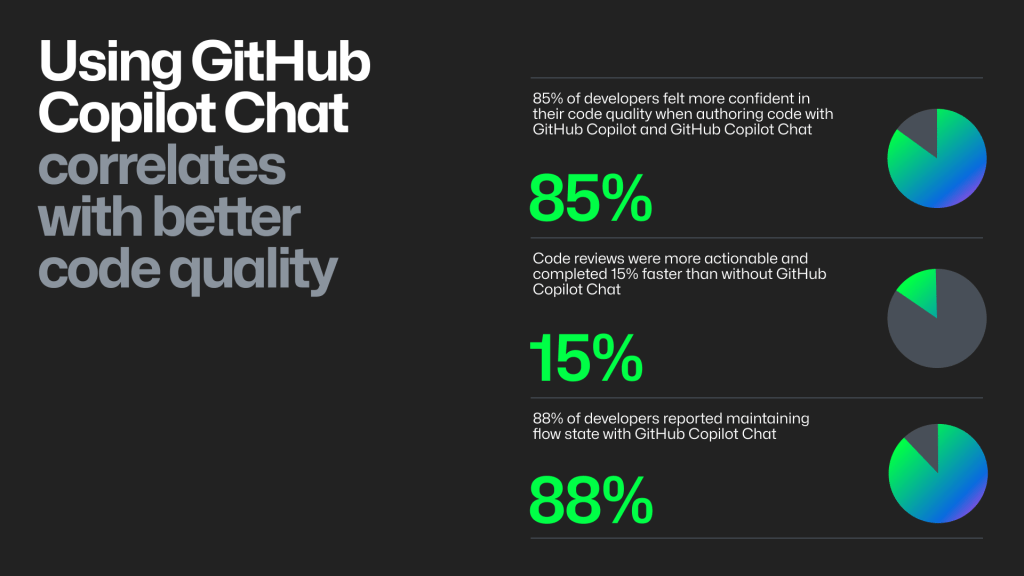
GitHub Copilot offers improvements in developer productivity by automating repetitive tasks. For developers, how much of you day is spent doing something, say, that you've done 1 million times before? As it stands, many of those menial tasks are becoming a thing of the past, freeing up more time for creative work – think 55% faster task completion using predictive text, and 50% faster time-to-merge. If you're trying to
Automation, at it's core, reduces the cognitive burden on developers, allowing them to focus on problem-solving. One of the main benefits Copilot brings is increased coding efficiency, which is further enhanced through GitHub Copilot prompt engineering.
In addition to boosting productivity, Copilot acts as a learning tool for new developers. By seeing real-time code suggestions, they can learn diverse coding techniques. Thus, Copilot can support the most seasoned of developers, while also offering a less dramatic learning curve for newcomers.
Can GitHub Copilot Generate Boilerplate Code and More?
Speaking of monotonous tasks – GitHub Copilot is particularly adept at generating boilerplate code, streamlining the development process. By filling in standard patterns you've seen 1,000 times over, it reduces the time developers spend on mundane setup tasks. This capability allows developers to focus on complex system logic and innovative features, instead of constantly treading over the same ground.
Beyond boilerplate code, Copilot can suggest more nuanced code solutions when provided with the right human prompts. Its advanced algorithms enable it to cater to various programming languages and frameworks. GitHub monorepo strategies benefit from this functionality by maintaining uniformity across diverse components.
Key Capabilities Include:
- Boilerplate Code: Quickly generates standard code structures.
- Code Suggestions: Provides context-aware recommendations.
- Versatility: Supports diverse languages and frameworks.
This wealth of functionality puts a spotlight on Copilot's role as a versatile assistant in the coder's toolkit, adapting to a wide range of development needs, while—crucially—remaining a tool, rather than substitution for developers.
Limitations and Risks: Why Copilot Can't Replace Human Developers
Despite its impressive capabilities, GitHub Copilot is not without limitations. One major concern is the possibility of producing incorrect or insecure code without human intervention. What also must be said – Copilot lacks the ability to fully understand context. Developers are not just cogs in a machine, they are absolutely essential for interpreting complex scenarios, making decisions that align with strategic objectives, and putting their real skills to use.
Key Limitations Include:
- Incorrect Code: Errors can slip through without careful oversight.
- Context Understanding: Limited grasp of complex scenarios.
- Ethical Concerns: Risk of intellectual property issues.
These challenges put an exclamation point on the real necessity for human involvement in the development process. While Copilot enhances productivity, it cannot replace the nuanced judgment and creative thinking that human developers provide for our teams and our businesses.
This begs the question, what's the best way to actual move forward with our teams? GitHub Copilot certification is one important consideration, we can't expect ourselves and our teams to produce error-free work with new tool when they're still finding their way around a new cockpit. PALO IT offers such certifications, as does GitHub, but whatever your course of action, education and upskilling are key.
Elements of Effective Training Include:
- AI Literacy: Understanding AI's role and limitations.
- Ethical Practices: Using AI responsibly.
- Skill Validation: Ensuring competence in AI tool usage.
The Human Element: Creativity, Context, and Collaboration
Let's talk creativity. Coding is an art! I may be biased in our own judgement, being a CTO myself, but it's something I believe strongly. While GitHub Copilot excels in handling rote tasks, the human touch is irreplaceable for creative and strategic thinking. Developers bring unique creativity to projects, enabling innovation beyond mere execution. This creativity leads to groundbreaking solutions that address the specific needs of a new start-up, a growing SME, or a S&P 500 stalwart.
Understanding context is where humans surpass AI in every way. Developers can assess the broader implications of code, incorporating business goals and stakeholder requirements. This skill ensures that solutions not only work technically but also meet our objectives. We cannot expect AI to run our business, and the same can be said about development.
Conclusion: Augmentation, Not Replacement—A New Era for Developers
GitHub Copilot marks a transformative step for software development, this much has probably already become very apparent to you, regardless of your role or industry – but the future of our dev teams lies in the synergy between AI tools and human expertise.
As a GitHub Partner of the Year, we've seen firsthand how the GitHub Copilot and AI tools in general can impact our client's team dynamics, daily operations and bottom line. Our methodology Gen-e2™ (Generative AI Enhanced Engineering)—which is powered by GitHub Copilot—is already delivering projects 2 to 5 times faster than conventional approaches, all by using AI to generate 95% of code, documentation, architecture diagrams, infrastructure as code, etc. These numbers might pop out at you, but what's crucial in our understanding of AI and its effects on developers stems back to training, certification and upskilling.
A successful developer's CV 5 years from now will look nothing like it does today. If you, your team, and your business want to make GitHub Copilot and AI training a priority, get in touch and let's get the conversation started.